
No products in the cart.
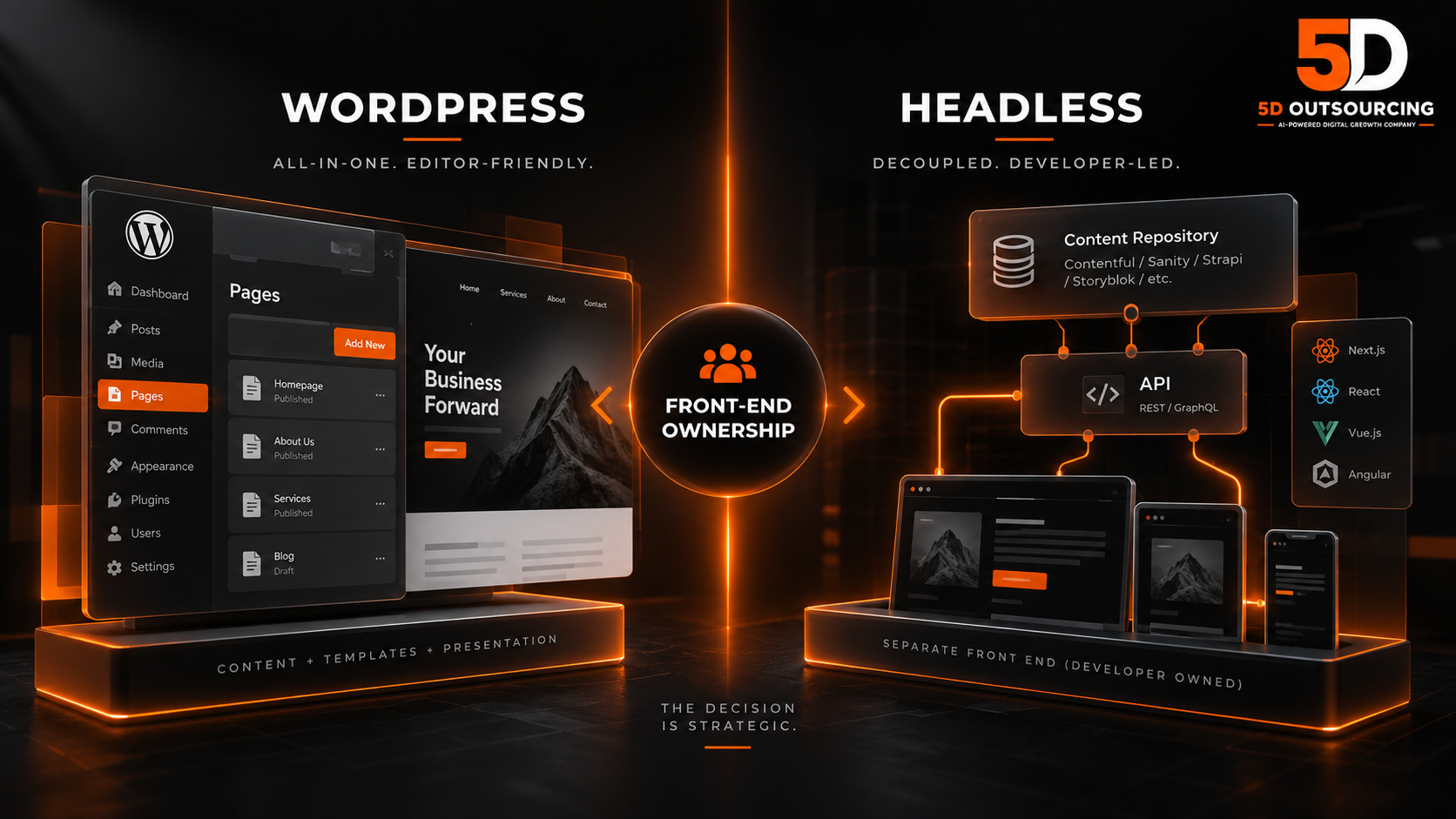
WordPress vs. Headless CMS for Enterprise Websites: The Decision Is About Who Maintains the Front End
Headless CMS is almost always sold as a performance decision. It is actually an organizational one.
The pitch is familiar: decouple the content from the presentation, serve the front end from a modern framework, get faster pages, more flexibility, better security, and freedom from plugin sprawl. Most of that is true. What the pitch leaves out is where the cost goes. A traditional WordPress site puts most of the ongoing work in the platform — plugins, themes and an admin screen that non-developers can operate. A headless architecture moves that work onto a development team, permanently. Every template change, every new landing page layout, every SEO field that a plugin used to handle becomes a ticket.
That is not an argument against headless. For some organizations it is plainly the right choice. It is an argument for making the decision on the right question — not “which is faster,” but “who is going to maintain the front end for the next five years, and do we have them?”
This page compares WordPress and headless CMS for enterprise websites as honestly as we can, including what each costs to run, what happens to SEO in each, and where the decision usually goes wrong. One disclosure first: 5D builds most of its client websites on WordPress. We have tried to write this as though we did not, and we say plainly below where headless wins.
What the Two Architectures Actually Are
Traditional (coupled) WordPress
Content, templates and presentation live in one system. Editors write in the WordPress admin, the theme renders the page, and plugins extend almost everything — SEO fields, forms, caching, redirects, multilingual support, structured data. One platform, one hosting environment, one login.
Headless CMS
The content management system stores and serves content through an API, and has no opinion about how it is displayed. A separate front-end application — commonly built on a JavaScript framework — fetches that content and renders the pages. Dedicated headless platforms such as Contentful, Sanity, Strapi and Storyblok are built for this model from the start.
The option most comparisons skip: WordPress as a headless back end
WordPress itself can run headless. Editors keep the familiar admin, content is exposed through the WordPress REST API or a GraphQL layer, and a separate front end renders it. This hybrid is often presented as the best of both worlds. It can be — but it also inherits the costs of both: you still maintain WordPress, and you now also maintain a custom front end. It is worth considering deliberately rather than as a compromise that avoids choosing.
The Real Question: Where Does the Work Go?
Every website carries an ongoing workload: new pages, layout changes, campaign landing pages, SEO fields, forms, redirects, integrations, security patches. The architecture decides who does that work.
In traditional WordPress, a large share of it is done by marketers and editors through the admin, with developers handling the rest. In a headless setup, the content is still edited by non-developers, but almost everything about how that content appears — templates, components, page structures, metadata handling — is code, owned by developers.
So the decision reduces to a staffing question. An organization with a standing front-end team, a product mindset and a release process will find headless liberating. An organization whose marketing team is used to building a landing page on a Tuesday afternoon will find that it now takes a sprint. Neither organization is wrong; they are different organizations, and they need different architectures.
Our view — labeled as strategic interpretation rather than a documented finding — is that a large proportion of disappointing headless projects are not technical failures at all. The site works. It is fast. And it stops changing, because the agency that built it has left, the internal team cannot modify the front end, and every marketing request now has nowhere to go.
Performance: Real, but Frequently Overstated
A well-built headless front end, statically generated or server-rendered and served from a content delivery network, can be extremely fast. That advantage is real.
But the comparison is usually made between a well-built headless site and a badly built WordPress site — one loaded with a page builder, thirty plugins and no caching. A well-built WordPress site, with a lean theme, disciplined plugins, proper caching, optimized images and a CDN, can meet Core Web Vitals comfortably. Most slow WordPress sites are slow because of how they were built, not because WordPress is slow.
The honest version: headless raises the performance ceiling and makes good performance easier to hold at scale. It does not make a site fast automatically — a headless front end with heavy client-side JavaScript and poor rendering choices can be slower than a tidy WordPress build. If speed is the main reason for considering headless, start with a performance audit of the current site, because the fix may be far cheaper than a rebuild. See website speed and performance optimization.
What Happens to SEO — the Part Most Headless Proposals Understate
This is where we would ask an enterprise buyer to slow down, because it is where the hidden cost is largest.
On a traditional WordPress site, an SEO plugin handles a long list of things almost for free: title and meta description fields per page, canonical tags, XML sitemaps, robots directives, breadcrumbs, basic structured data, redirect management, and open graph tags. Editors can change most of them without a developer.
On a headless site, every one of those becomes something the front-end application must implement. The CMS stores the fields; the front end has to render them correctly, generate the sitemap, handle canonicals, return correct status codes, manage redirects, and output structured data. None of this is difficult for a competent team. All of it is work, and all of it is easy to get subtly wrong in ways that do not show up until rankings move.
Three specific risks are worth naming:
- Rendering. If the front end renders content in the browser with JavaScript rather than on the server, search engines and — more importantly now — many AI crawlers may see less of the page than a human does. Server-side rendering or static generation removes most of this risk; client-only rendering invites it.
- Migration. Moving from WordPress to headless is a full migration. Every URL, redirect, canonical, and piece of structured data has to be carried across deliberately. This is where most organic losses in replatforming actually happen.
- Editorial independence. If editors cannot change a meta description or add a redirect without a developer, those changes stop happening, and on-page SEO quietly decays.
The practical requirements are in our technical SEO audit checklist, with the page-level standard in the on-page SEO guide and site structure in internal linking strategy.
AI Search Changes the Calculation Slightly
As more discovery happens inside AI assistants and answer engines, two properties matter more than they used to: whether the content is fully present in the rendered HTML, and whether the organization’s entity data is expressed consistently as structured data.
Neither architecture guarantees either. A headless site with server rendering and a disciplined structured data layer can be excellent for machine readability. A headless site that renders in the browser and generates schema inconsistently can be worse than a plain WordPress site with a good SEO plugin. The architecture is not the variable; the implementation is. The considerations are covered in generative engine optimization, entity optimization explained and AI search ranking factors.
Security and Maintenance
WordPress’s security reputation comes mostly from its ecosystem rather than its core. The core is actively maintained; most real-world compromises come from outdated plugins, abandoned themes, weak credentials and neglected updates. A well-governed WordPress installation — few, reputable plugins, prompt updates, restricted admin access, managed hosting, backups — is a defensible enterprise platform.
Headless reduces the public attack surface, because the CMS admin need not be exposed on the public website and the front end is often static or server-rendered with no database behind it. That is a genuine advantage. It does not remove maintenance — it redistributes it across a CMS subscription or installation, a front-end codebase with its own dependencies, a hosting platform for that front end, and the API connections between them. More moving parts, each simpler, owned by more people.
For ongoing support in either model, see website maintenance and support.
Cost: Build Cost Is the Smaller Number
Headless builds usually cost more upfront, because the front end is custom software rather than a configured theme. But for enterprise decisions, the build is rarely the number that matters. What matters is the cost of change over the life of the site.
Ask of each option: what does it cost to add a new page template? A new campaign landing page? A new language? A new form connected to the CRM? A new schema type across a section? In WordPress, many of these are configuration. In headless, most are development. Multiply by the number of changes your marketing team makes in a year, and the comparison often inverts.
Licensing also differs. WordPress itself is open source, with costs coming from hosting, premium plugins and development. Many dedicated headless platforms are commercial SaaS products priced by users, content volume, locales or API usage, and those costs can rise meaningfully as a site grows. Check the pricing model against your projected scale, not your launch scale. General build-cost context is in website development cost in Egypt.
When WordPress Is the Better Choice
- The website is primarily a marketing and content site, and the marketing team needs to publish and change pages without developers.
- There is no permanent in-house front-end team, and the organization does not intend to build one.
- SEO depends on high content velocity and editorial control over metadata and structure.
- The site needs e-commerce that WooCommerce handles well — see WooCommerce development.
- Budget favors a lower cost of change over a higher performance ceiling.
- Multilingual Arabic and English content is needed without building right-to-left support from scratch.
When Headless Is the Better Choice
- The same content must feed several channels — website, mobile app, customer portal, in-store screens, partner feeds — where a single content source genuinely pays off.
- There is a permanent product and engineering team that owns the front end and ships on a release process.
- The site is effectively a web application, with heavy interactivity, personalization or logged-in experiences that a theme-based site struggles with.
- Performance at very large scale or high traffic peaks is a hard commercial requirement.
- Security or compliance policy requires the content system to be isolated from the public web.
- The organization already runs a modern JavaScript stack and wants the website to match it.
If three or more of the second list are true and you have the team to back it, headless is probably right. If most of the first list is true, the argument for headless is usually about fashion rather than fit.
The Migration Question
For an organization already on WordPress, the decision is not really “which platform is better.” It is “is the gain from moving larger than the cost and risk of moving.” Replatforming carries real risk to organic visibility, takes marketing capacity away from campaigns for months, and resets the team’s working knowledge of the site.
A useful discipline: list the specific problems the current site has, then ask whether each one is caused by the architecture or by how the current site was built. Slow pages, messy templates, plugin conflicts and poor content structure are usually build problems, and a well-executed redesign on the same platform can fix them at a fraction of the risk. Multi-channel content delivery, app-like interactivity and front-end release management are architecture problems, and a redesign will not fix them.
Common Mistakes in This Decision
- Choosing headless for speed alone. The same speed is often achievable on a well-built WordPress site for far less.
- No front-end owner after launch. The site works, and then it stops changing.
- Assuming SEO comes with the CMS. In headless it comes with the front end, and someone has to build it.
- Client-side rendering for content pages. Crawlers and AI systems may see less than users do.
- Comparing a good headless build to a bad WordPress build. The comparison that matters is good against good.
- Ignoring the cost of change. Build cost is visible; the cost of every future change is where the money goes.
- Underestimating migration. URLs, redirects, canonicals and structured data all need a deliberate plan.
- Staying on WordPress out of habit. The opposite error — ignoring a real multi-channel or application requirement because the current platform is familiar.
Questions to Ask Any Agency Proposing Headless
If you are evaluating a headless proposal — from us or anyone else — these questions separate a considered recommendation from a fashionable one.
- Who will change the front end after launch, and at what cost per change? If the answer is “us, on retainer,” price that into the comparison for five years, not one.
- How will editors preview content before publishing? Preview is native in WordPress and has to be built in most headless setups. Without it, editors publish blind.
- How are pages rendered — on the server, at build time, or in the browser? Any answer that relies on the browser for content pages deserves a follow-up about crawlability.
- Which SEO fields can editors control without a developer? Titles, meta descriptions, canonicals, redirects, indexing controls and structured data should all be on the list.
- What is the migration plan for existing URLs and rankings? Ask to see the redirect mapping approach before the design work starts, not after.
- What does the CMS license cost at three times today’s content volume and users? Launch pricing is rarely the pricing that matters.
- What happens if we part ways? Who owns the front-end code, the hosting accounts and the CMS workspace, and can another team pick it up?
A good answer to all seven is a strong sign the recommendation fits your organization. Vague answers to the first three are the most common warning sign we see.
How 5D Approaches This Decision
We start with how your organization actually operates rather than with the platform: who publishes content and how often, who owns the front end today and who will in three years, which channels need content, what your SEO depends on, and what problems the current site genuinely has. Then we separate the problems that are caused by the architecture from the problems caused by the build, because the second kind rarely justifies a replatform.
We build most client websites on WordPress, and we say so openly because it is the relevant bias to disclose. Where the requirements point to headless — multi-channel content, an app-like front end, a standing engineering team — we will say so, and we would rather recommend the right architecture than the one we build most often. Where they do not, we will tell you that a well-built WordPress site will serve you better for less.
Build options are covered in WordPress development services and corporate website design. For the broader platform comparison at smaller scale, see WordPress versus Shopify versus custom development. For organizations where the website decision sits inside a larger governance, measurement and entity problem, see enterprise digital marketing and AI search services, and where the question is really about growth priorities, digital growth consulting.
Read more about 5D, see the 5D philosophy, browse the service overview, or check our frequently asked questions.
Related Guides
Platform and build: WordPress vs Shopify vs custom · WordPress development · WooCommerce development · website redesign · website development cost
Performance and SEO: speed and Core Web Vitals · technical SEO audit checklist · on-page SEO · internal linking
AI search readiness: generative engine optimization · entity optimization · AI search ranking factors · AI search audit
Conversion: UX optimization · landing page optimization · CRO services · CRM integration
Frequently Asked Questions
Is headless CMS better than WordPress?
Neither is better in general. Headless suits organizations that need the same content across several channels, run a permanent front-end team, or are effectively building a web application. WordPress suits organizations whose website is mainly a marketing and content platform that editors need to change without developers. The deciding factor is usually staffing and operating model, not technology.
Is a headless website faster than WordPress?
It can be, and it makes good performance easier to maintain at scale. But a well-built WordPress site with a lean theme, disciplined plugins, caching and a CDN can meet Core Web Vitals comfortably, and a poorly built headless site can be slow. If speed is the main concern, audit the current site first — the fix is often far cheaper than a rebuild.
Does headless hurt SEO?
Not inherently, but it moves SEO responsibility from plugins to developers. Metadata, canonicals, sitemaps, redirects and structured data all have to be built into the front end. Done well, headless SEO can be excellent. The common problems are client-side rendering, incomplete migrations and editors losing control of metadata.
Can WordPress be used as a headless CMS?
Yes. WordPress can expose content through its REST API or a GraphQL layer while a separate front end renders the site. Editors keep the familiar admin. The trade-off is that you maintain both WordPress and a custom front end, so it should be a deliberate choice rather than a way of avoiding one.
Is WordPress secure enough for an enterprise website?
With proper governance, yes. Most WordPress compromises come from outdated plugins, abandoned themes and weak credentials rather than the core. Few reputable plugins, prompt updates, restricted admin access, managed hosting and tested backups make it a defensible platform. Headless does reduce the public attack surface, which is a genuine advantage where security policy demands it.
Which is cheaper over time?
It depends on how often your site changes. Headless usually costs more to build. The bigger number is the cost of each future change: in WordPress many changes are configuration, in headless most are development. Organizations that publish and adjust pages frequently often find WordPress cheaper to run; organizations with a standing engineering team may not see the difference.
We are already on WordPress. Should we migrate to headless?
Only if the problems you have are caused by the architecture rather than by how the current site was built. Slow pages, plugin conflicts and messy templates are usually build problems that a redesign on the same platform can fix. Multi-channel content delivery and app-like front ends are architecture problems that justify a move. Migration carries real risk to organic traffic, so the gain needs to be clear.
What does a headless site need that WordPress provides automatically?
Most of what an SEO plugin does: per-page titles and meta descriptions rendered correctly, canonical tags, XML sitemaps, robots directives, redirects, breadcrumbs, structured data and social sharing tags. It also needs a front-end preview so editors can see changes before publishing, which traditional WordPress provides natively.
Does headless work for Arabic and English websites?
Yes, but right-to-left layout and language switching have to be designed and built in the front end. WordPress has mature multilingual tooling and many themes support right-to-left layouts already. For bilingual sites without a dedicated front-end team, that difference can be significant.
Does 5D build headless websites?
We build most client websites on WordPress and say so openly. When an organization’s requirements genuinely point to headless — multiple channels, an application-style front end, a permanent engineering team — we recommend it. When they do not, we recommend a well-built WordPress site instead, because it will serve the organization better at lower cost.
Decide on the Operating Model, Not the Technology
Before comparing platforms, answer one question honestly: who will maintain the front end of this website in three years, and how often will your marketing team need to change it? Most of the right answer follows from that.
If you want an independent view on your current site and requirements — including a straight answer on whether a rebuild is justified at all — we are happy to look.
Leave a Reply